A function is a set of actions defined by a user, which affects one or more objects as per the definition. The function block starts with the function keyword. Functions, once created, can be reused in other parts of the document. The syntax for defining a function is as follows:
function functionname()
{
..
....
.......
}
Some important function are listed below:
array_slice() function
The array_slice() function is used to extract a large piece of an array. The syntax of the array_slice() function is as follows:
array array_slice ( array $array , int $offset [, int $length [, bool $preserve_keys = false ]] )
the parameter can be defined as,
Option
Description
array
It is the input array.
offset
If offset is positive, the sequence starts from that offset in the array. If offset is negative, the sequence starts from the end of the array.
length
If the length is omitted, array_slice() assumes that the user wants all elements from the starting position onward returned.
preserve_keys
When this option is used, array_slice() preserves the keys and does not reorder them.
array_shift() function
The array_shift() function is used to remove and return the first element of an array passed to it as an argument. It is used mainly to create a queue and act on it until the queue is empty. The array_shift() function either returns the shifted value of an array, or returns the NULL value if array is empty or argument passed is not an array.
array_merge() function
The array_merge() function is used to merge two or more arrays by combining all their elements. If the input arrays have the same index keys, the later value for that key overwrites the previous one. If arrays contain keys in numeric form, the later value for that key appends the index keys instead of overwriting it.
array_intersect() function
The array_intersect() function extracts all the elements that are common for two or more arrays. Since this function only checks whether the values are the same, the index keys of arrays are ignored. Let's take an example to understand this:
The output of the above script will be array(3) { ["'a'"]=> int(20) [0]=> int(30) [1]=> int(35) } since three elements (20, 30, 35) are common in both arrays, i.e., $array1 and $array2.
sort() function
The sort() function is used to sort a given array either alphabetically if any strings are present or numerically if all elements are numbers. However, a user cannot pass an associative array to the sort() function. The reason behind this is that the values of the array are sorted as expected but keys are replaced by numerical indices that follow the sort order.
asort() function
The asort() function accepts an associative array and sorts its values either alphabetically if any strings are present or numerically if all elements are numbers. However, the asort() function preserves the array keys.
ksort() function
The ksort() function accepts an associative array and sorts its keys either alphabetically if any strings are present, or numerically if all elements are numbers. However, it does not sort the elements of the associative array.
In PHP a function is a predefined set of commands that are carried out when the function is invoked. In addition to being able to write your own functions, PHP has a number of predefine functions for you to use. In function, the interpreter simply starts at the beginning and works its way to the end in a linear fashion. In the real world, this simple approach is rarely practical; for example, you might want to perform a certain operation more than once in different portions of your code. To do so, PHP supports a facility known as a function.
Functions must be declared using the following syntax:
function function_name ([param1], [param 2])
In PHP each function is assigned a name and can receive one or more than one parameters. The parameters exist as variables throughout the execution of the entire function.
Simple function with a parameter:
<?php
function square ($sqr)
{
return $sqr * $sqr;
}
$my_sqr = 50;
echo square ($my_sqr);
?>
The $sqr variable is created whenever the square function is called and initialized with the value passed to it. The return statement is used to return a value from the
function, which later on passes to the calling script. Normally, parameters are passed by some value, this means that, in the previous example, a copy of the $my_sqr variable is placed in the $sqr variable when the function begins, and any changes to the newly generated variable in the function body does not affects former value. But you can overcome this situation by passing a parameter by reference so that any changes performed within the function will also be reflected to the former value. In passing the reference it not only passes the value but also the reference for that value.
<?php
function square (&$my_sqr)
{
$my_sqr += 10;
return $my_sqr * $my_sqr;
}
$sqr = 50;
echo square ($sqr);
?>
You can also assign a default value to any of the parameters of a function when declaring it. This way, if the caller does not provide a value for the parameter, the default one will be used instead:
<?php
function square ($my_sqr = 50)
{
return $my_sqr * $my_sqr;
}
echo square ();
?>
In this case, because no value has been passed for $sqr, the default of 50 will be used by the interpreter. Note that you can’t assign a default value to a parameter passed by reference.
Scope of Functions and Variable
It’s significant to point out that there is no connection between the name of a variable declared inside a function body and any equivalent variables declared outside of it. In PHP, variable scope works differently from most other languages so that what resides in the global scope is not automatically available in a function’s scope. It can be stated more clearly from the following example:
<?php
function square ()
{
$sqr += 10;
return $sqr * $sqr;
}
$sqr = 50;
echo square ();
?>
In this case, the script assumes that the $sqr variable, which is part of the global scope, will be automatically included in the scope of square(). However, this does not take place, so $sqr has a value of Null inside the function, resulting in a return value of 0. If you want to import global variables inside a function’s scope, you can do so by using the global statement:
<?php
function square ()
{
global $sqr;
$sqr += 10;
return $sqr * $sqr;
}
$years = 50;
echo square ();
?>
The $sqr variable is now accessible to the function, where it can be used and modified. Note that by importing the variable inside the function’s scope, any changes made to it will be reflected in the global scope as well—in other words, you’ll be accessing the variable itself, and not an ad hoc copy as you would with a parameter passed by value.
Functions with Variable Parameters
You can also know about the number and types of parameter passed to a particular function. For this you have to just create a function that accepts a variable number of arguments using a number of functions that PHP makes available for you:
func_num_args() returns the number of parameters passed to a function.
func_get_arg($arg_num) returns a particular parameter, given its position in the parameter list.
func_get_args() returns an array containing all the parameters in the parameter list.
As an example, let’s write a function that calculates the arithmetic average of all the parameters passed to it:
<?php
function class_avg()
{
$arg = func_num_args();
if ($arg == 0)
return 0;
$total = 0;
for ($i = 0; $i < $arg; $i++)
$total += func_get_args($i);
return $total / $arg;
}
echo class_avg (89, 44, 64, 49, 75, 90);
?>
In the preceding example, we started the script by determining the number of arguments and if there is no argument then we are exiting immediately from the function. The reason behind this is that the last instruction would cause a division-by-zero error. Further, we create a for loop that simply cycles through each parameter in sequence, adding its value to the sum. At last, we calculate and return the average value by dividing the sum by the number of parameters. Note how we stored the value of the parameter count in the $arg variable—we did so in order to make the script a bit more efficient because otherwise we would have had to perform a call to func_get_args() for every cycle of the for loop. That would have been rather wasteful because a function call is quite expensive in terms of performance and the number of parameters passed to the function does not change during its execution.
Variable Variables and Variable Functions
PHP supports two very useful features known as variable variables and variable functions.
The former allows you use the value of a variable as the name of a variable. Sound confusing? Look at this example:
<?php
$x = 100;
$y = ‘x’;
echo $$y;
?>
When this script is executed and the interpreter encounters the $$y expression, it first determines the value of $y, which is the string a. It then reevaluates the expression with a substituted for $y as $x, thus returning the value of the $x variable. Similarly, you can use a variable’s value as the name of a function:
<?php
function odd_number ($x)
{
echo “$x is odd”;
}
function even_number ($x)
{
echo “$x is even”;
}
$n = 15;
$a = ($n % 2 ? ‘odd_number’ : ‘even_number’);
$a($n);
?>
At the end of the script, $a will contain either odd_number or even_number. The expression $a($n) will then be evaluated as a call to either odd_number() or even_number(). Variable variables and variable functions can be tremendously valuable and convenient. However, they tend to make your code obscure because the only way to really tell what happens during the script’s execution is to execute it—you can’t determine whether what you have written is correct by simply looking at it. As a result, you should only really use variable variables and functions when their usefulness outweighs the potential problems that they can introduce.
A loop is a sequence of instruction s that is continually repeated until a certain condition is reached. Loops are basically types of control construct. Loops can be combined so that they are executed at the same time, thus improving the run-time efficiency. Loops save the time of the computers by setting a single code for recurring tasks. They are good because once they are compiled they run over and over again until they reach their limit. Hence resulting in improved efficiency. PHP also supports the following loops:
The while Structure
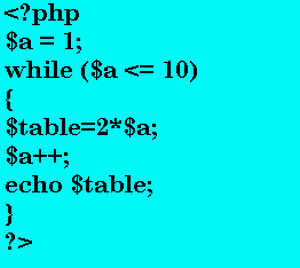
A while statement executes a code block until a condition is set:
This prints the table of 2. The instructions written inside the While Loop continues to execute until the value of $a exceeds 10.
Infinite loops are usually not a good thing, but, because PHP provides the proper mechanism for interrupting the loop at any point, they can also be useful.
In this block of code, the (true) condition is always satisfied and, therefore, the compiler will be more than happy to go on repeating the code block forever. Inside the code block itself, we perform two if-then conditions, and the second one is dependent on the first so that the $b > 50 will only be evaluated after $a > 100, and, if both are true, the break statement will cause the execution point to exit from the loop into the preceding scope. Naturally, we could have written this loop just by using the condition ($a <=100 && $b <= 50) in the while loop, but it would have been less efficient because we’d have to perform the check twice. (Remember, $b doesn’t increment unless $a is greater than 100.) If the second condition were a complex expression, our script’s performance might have suffered.
The do-while Structure
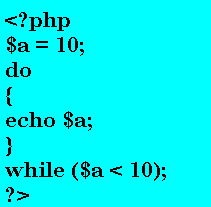
The major problem with the while() loop is that, if the condition never evaluates to True, the statements inside the code block are never executed. In some cases, it might be preferable that the code be executed at least once, and then the condition evaluated to determine whether it will be necessary to execute it again.
This can be achieved in one of two ways: either by copying the code outside of the while loop into a separate code block, which is inefficient and makes your scripts more difficult to maintain, or by using a do-while loop:
In this above block of code, $a will be printed once even after the condition is false ($a is not less that 10) because we are using do-while loop which executes the statements written inside the do while loop at least one time even if the condition is false.
The For Loop
The statements in the for loop repeat continuously for a specific number of times. The while and do-while loops repeat until a certain condition is met. The for loop repeats until a specific count is met. You can use a for loop when the number of repetition is know, or can be supplied by the user.
As you can see, the declaration of a for loop is broken in to three parts:
The first expression is known as start Expression. It is evaluated before the loop begins. This start Expression is evaluated only once at the beginning of the loop.
The second represents the condition that must be satisfied for the loop to continue. Finally, the third contains a set of instructions that are executed once at the end of every iteration of the loop before the condition is tested.
Naturally, you can also create a for loop that is infinite in a number of ways, in fact. You could omit the second expression from the declaration, which would cause the interpreter to always evaluate the condition to true. You could omit the third expression and never perform any actions in the code block associated with the loop that will cause the condition in the second expression to be evaluated as true. You can even omit all three expressions using the form for(;;) and end up with the equivalent of while(true).
You can also use while loop inside the For Loop. This can be illustrated more clearly from the following example:
By executing the above block of code it will print the table from 1 to 10.
There are different types of operators in PHP. Variables, constants, and data types will not be very beneficial to you until you can’t merge and manipulate them in a numerous ways. In PHP, it can be done easily by using operators. PHP recognizes several classes of operators, depending on what purpose they are used for. We can list the operators as follows:
The Assignment Operator
The assignment operator '=' is used to assign a value to a variable:
$x = 65;
$y = “Joseph is a good boy”;
It’s vital to understand that, by default, variables are assigned by value. This means that by doing following:
$x = $y
It will assigns the value of $y to $x. But, if you change $y after assigning, $x will remain the same. Sometimes you don't want to do this and want that when you change the value of $y, it is also been reflected in $x. You can do it easily by assigning to $x a reference to $y:
$x = &$y
Any change to $y will now also be reflected in $x.
Arithmetic Operators
The next operator in this category is Arithmetic operators. These operators are used to do arithmetic calculations like addition, subtraction etc. Arithmetic operators are always been used in binary operations (means that they always include two operators):
Addition (+)
Subtraction (-)
Multiplication (*)
Division (/)
Modulus (%)
In PHP modulus operation works a bit different from the typical mathematical operation as it returns a signed value rather than an absolute one. PHP also inherits 4 special incrementing/decrementing operators from the C language.
The prefix incrementing operator ++ increases the value of the variable that succeeds it, and then returns its new value. For example, ++$x will firstly increase the value of $x by 1 and then return it.
The postfix incrementing operator ++ returns the value of the variable that pre-cedes it, and then increments its value. For example, $x++ will instantly returns the value of $x and after that it increases the value of $x by 1 for the next operation.
The prefix decrementing operator --decrements the value of the variable that succeeds it, and then returns its new value. For example, --$x will first decreases the value of $x and then returns it.
The postfix decrementing operator -- returns the value of the variable that precedes it, and then decrements its value. For example, $x-- will instantly returns the value of $x and after that it decreases the value of $x by 1 for the next operation.
There is always a great confusion in between these operators, but if you follow a simple rule then it wil be very easy for you. The rule is that if the variable is placed after the operator (Prefix version) then you must increase or decrease the value first.
But if the variable is placed before the operator (Postfix version) then you must returns the value first and after that increase or decrease the value of the variable.
Bitwise Operators
The next operator in this category is Bitwise operator. It manipulates the value of variables at the bit level:
The bitwise AND (&) operation causes the value of a bit to be set if it is set in both the left and right operands.
For example, 1 & 1 = 1, whereas 1 & 2 = 0
The bitwise OR (|) operation causes the value of a bit to be set if it is set in either the left or right operands.
For example, 1 | 1 = 1 and 1 | 2 = 3
The bitwise XOR (^) operation causes the value of a bit to be set if it is set in either the left or right operands, but not in both.
For example, 1 ^ 1 = 0, 1 ^ 0 = 1
The bitwise NOT (~) operation causes the bits in its operand to be reversed—that is, set if they are not and unset otherwise. The bitwise left-shift (<<) and right-shift (>>) operators actually shift the bits of the left operands left or right by the number of positions specified by the right operand.
Comparison Operators
The next operator in this category is Comparison operator. Comparison operators are used to establish the relationship between two operands. The result of a comparison is always a Boolean value:
The = = operator determines if two values are equal. For example:
$x = = $y where both $x and $y are equal to 10
The != operator determines if two values are different. For example:
$x != $y where $x = 15 and $y=18
The < operator determines whether the left operand’s value is less than the right operand’s. For example:
$x < $y where $x = 25 and $y=67
The > operator determines whether the left operand’s value is greater than the right operand’s. For example:
$x > $y where $x = 85 and $y=62
The <= operator determines whether the left operand’s value is less than or equal to the right operand’s. For example:
$x <= $y where $y = 85 and $x=85 or less than 85
The >= operator determines whether the left operand’s value is greater than the right operand’s. For example:
$x >= $y where $x = 28 and $y=28 or less than 28
Logical Operators
The next operator in this category is Logical operator. Logical operators are generally used in conjunction with comparison operators to create complex decision process. They also return a Boolean result:
The AND operator (indicated by the keyword and or by &&) returns True if both the left and right operands cannot be evaluated to False. For example:
($x < $y) && ($x > $z )
returns true if $x = 25 , $y=67 and $z=10
The OR operator (indicated by the keyword or or by ||) returns True if either the left or right operand cannot be evaluated as False. For example:
($x < $y) || ($x > $z )
returns true if $x = 25 , $y=67 and $z=90
The XOR operator (indicated by the keyword xor) returns True if either the left or right operand can be evaluated as True, but not both. For example:
($x < $y) || ($x > $z )
returns False if $x = 25 , $y=67 and $z=15
The unary NOT operator (indicated by !) returns False if the operand can be evaluated as True, and True otherwise.
Precedence of PHP Operators
Operator precedence determines the grouping of terms in an expression. Certain operators have higher precedence than others; for example, the multiplication operator has higher precedence than the addition operator:
For example x = 8 + 6 * 9; Here x is assigned 62, not 126 because operator * has higher precedence than + so it first get multiplied with 6*9 and then adds into 8.
You can easily understand the precedence of operators with the following table:
I found a very useful video describing page caching in Zend Server and I want to share it with all of you. In the following video,you can learn how to set up a page caching rule in Zend Server 5 in order to optimize performance in a demo PHP application. This is very simple instead of writing the application with caching in mind. I am sure that this video will surely help you and increase your knowledge.
The Zend PHP5 ZCE certification is designed to test the level of knowledge and web programming of a candidate using PHP language. Before taking the Zend 200-500 exam, you should practice the following:
You should thoroughly understand PHP syntax, operators, variables, constants, functions, and arrays in order to achieve good marks.
You should practice and understand OOPS modifiers/inheritance, interfaces, and exceptions.
You should know how to implement static methods and properties, and autoload.
Practice on configuring and managing session security.
You should be able to perform cross-site scripting and cross-site request forgeries.
You should also learn how to mitigate SQL injection, remote code injection, and email injection.
You should thoroughly learn and understand XML basics, simple XML, XML extension, and Xpath.
You should also practice and understand Web services basics.
You should know how to implement SOAP and REST.
You should be able to perform string searching, replacing, and formatting.
You should analyze SQL queries and prepared statements.
You must be able to perform GET and POST data.
You should know how to implement cookies and HTTP headers.
You should practice to perform files reading and writing.
You must be able to learn and understand file system functions and streams.
The Zend PHP 200-500 exam is designed to test an candidate's knowledge of PHP programming, PHP security, XML and Web services, streaming and network programming, etc. Mainly, this test measures the examinees experience in PHP programming. The main goal of this exam is to allow PHP professionals to attain the "Zend Certified Engineer" designation.
Key Objectives of the exam
This certification exam mainly tests your ability in the following areas:
PHP Basics - This objective mainly test your ability in understanding the basic fundamentals of PHP including Syntax, Operators, Variables, Constants etc. In my opinion this is a really good area to score.
Functions and Arrays- This objective validates your proficiency in using Function syntax, and Arguments. It also tests your knowledge in dealing with different type of arrays such as enumerated arrays, multi-dimensional arrays etc. You will have to practice a lot in this area for scoring good marks.
Object Oriented Programming - This objective authenticates your ability and knowledge in underatanding OOP concepts, Instantiation, Modifiers/Inheritance, Interfaces, Exceptions etc.
Security - This objective mainly test your ability in configuration, Session Security, Cross-Site Scripting, Filter Input, and Escape Output etc.
XML and Web Services - This objective mainly deals your skills in understanding with XML Basics, SimpleXML, XML Extension, Xpath. So, you have to practice these type of question to excel in this section.
Strings and Patterns - This objective validates your proficiency in using Searching, Replacing, Formatting strings.
Databases and SQL - This objective deals with database concepts. It tests your ability in using SQL, Joins, Analyzing SQL Queries, Prepared Statements etc.
Web Features - You have to practice a lot about using Sessions, Forms, GET and POST data, Cookies, HTTP Headers to excel and score good marks in this objective.
Streams and Network Programming - This objective includes dealing with file reading and writing, file systems functions and streams.
Number Of Questions
You will be required to attempt 70 questions in the exam.To pass you need a score of 70% . You have to answer these question in 90 minutes.
Why should I earn Zend PHP5 Certification ?
There are numerous advantages of becoming a Zend PHP ZCE (Zend Certified Engineer). I can cover some key points here :
Zend products and PHP programming are most broadly and openly used in the current era and the Zend PHP5 ZCE certification approves your expertise on the Zend products and PHP language.
Candidates who are already earned the Zend Certified Engineer (ZCE) certification are considered as top favorites by the employers and also the No.1 choice for the job and they also get preference in promotions.
The PHP5 ZCE certification is helpful for professionals who have an entry-level certification in related PHP technologies and want to upgrade their credentials and get recognition from the industry.
A Zend PHP5 Certified professional can find a appropriate job easily and get paid more. And most importantly, on average, a ZCE certified person gets more salary than one having the same job profile.
Any Pre-Requisites for the Zend 200-500 exam?
The candidates who wish to take this ZEND PHP5 exam, they have to take only one test, i.e., Zend 200-50 exam to achieve the ZEND PHP5 certification. Although there are no prerequisites for this certification, it would be helpful if they have hands on experience using the Zend PHP5.
How Much Is The Exam Fees?
The Fee for taking ZEND PHP5 200-500 exam is US$125.
Where To Take The Exam?
The candidates may get register themselves at Pearson VUE testing center to take the exam. After you purchase your exam voucher, you can contact an authorized Pearson VUE center to schedule your exam date, time, and location. You can book the exam within one year from the date of purchase of the voucher. The exam date may depend on your choice (and availability of slot) in your selected test center.
PHP which is also known as Hypertext Preprocessor is a broadly used, open source general-purpose scripting language that was originally designed for web development to produce dynamic web pages. For this reason, PHP code is implanted into the HTML source document and interpreted by a web server with a PHP processor module, which generates the web page document. PHP code is processed by an interpreter application in command-line mode performing desired operating system operations and producing program output on its standard output channel. The PHP code is enclosed in special start and end processing instructions that allows you to switch into and out of PHP mode. PHP is available as a processor for many of the current web servers and as separate interpreter on most operating systems.
PHP originally stood for personal home page. It was introduce way back in 1994 as a set of Common Gateway Interface (CGI) binaries written in the C programming language.
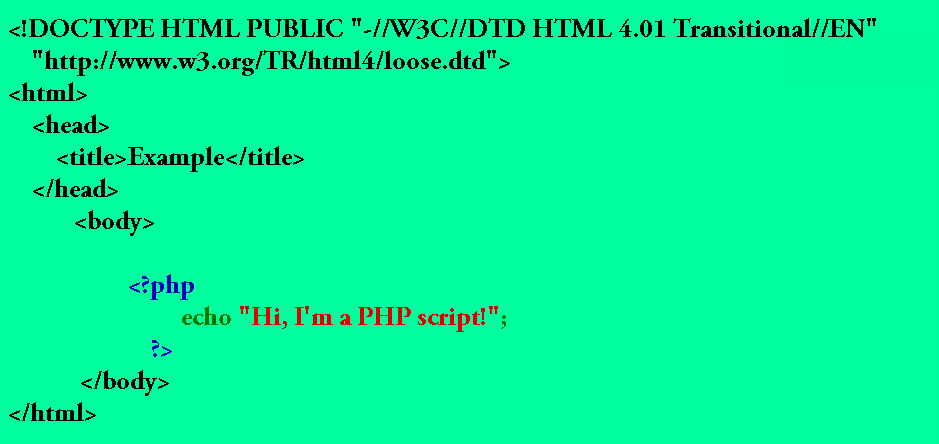
Simple PHP beginner example
PHP is a general-purpose scripting language that is especially suited to server-side web development where PHP generally runs on a web server. Any PHP code in a requested file is executed by the PHP runtime, usually to create dynamic web page content. It can also be used for command-line scripting and client-side GUI applications. PHP can be deployed on most web servers, many operating systems and platforms, and can be used with many relational database management systems. It is available free of charge, and the PHP Group provides the complete source code for users to build, customize and extend for their own use.
PHP primarily acts as a filter,taking input from a file or stream containing text and/or PHP instructions and outputs another stream of data; most commonly the output will be HTML. Since PHP 4, the PHP parser compiles input to produce byte code for processing by the Zend Engine, giving improved performance over its interpreter predecessor.
PHP was originally designed to create dynamic web pages, but now PHP focuses mainly on server-side scripting, and it is similar to other server-side scripting languages that provide dynamic content from a web server to a client, such as Microsoft's Active Server Pages, Sun Microsystems' JavaServer Pages, and mod_perl. PHP has also attracted the development of many frameworks that provide building blocks and a design structure to promote rapid application development (RAD). Some of these include CakePHP, Symfony, CodeIgniter, and Zend Framework, offering features similar to other web application frameworks.
The LAMP architecture has become popular in the web industry as a way of deploying web applications. PHP is commonly used as the P in this bundle alongside Linux, Apache and MySQL, although the P may also refer to Python or Perl or some combination of the three.
A new major version has been under development alongside PHP 5 for several years. This version was originally planned to be released as PHP 6 as a result of its significant changes, which included plans for full Unicode support. The new version is set to remove many old features such as the removal of register globals, magic quotes, and safe mode.The reason for the removals was that register_globals had given way to security holes, and magic quotes had an unpredictable nature, and was best avoided. Instead, to escape characters, magic quotes may be substituted with the addslashes() function, or more appropriately an escape mechanism specific to the database vendor itself like mysql_real_escape_string() for MySQL.
I am here to provide you with every clinch of knowledge about certification exams and its impact on your career. Any certification exam will boost your career and take it to new heights. I will describe to you with every bit and bytes of detail about certification exams.
You can also leave your Questions at itexams.expert@hotmail.com